One event. Every take.
It's not just collecting photos. It's the party that doubles the shots.
Photo missions, likes and a live ranking turn every guest into a photographer — and the big screen shows it all in real time. They scan the QR code at the table and join straight from the browser, no app to install, no account to create. Your event's collaborative album grows on its own.
Join a party →No app to installNo guest sign-upBorn at a real party
Animated demo: a guest joins the event, uploads a photo, gets likes and climbs the ranking.
This is what guests see — right in their browser.
How the collaborative album works
From invite to final download, in four steps.
- 1
Create your event in a conversation
Tell our AI about your event — birthday, wedding, graduation, corporate — and it sets everything up, with photo missions to match the theme.
- 2
Print the QR code and drop it on the tables
Every guest scans it, picks an emoji avatar and joins in seconds. No app, no password, no friction.
- 3
Everyone shoots — and the album grows live
Photos land in the feed instantly. Missions earn points, likes earn points, and the ranking keeps the party buzzing.
- 4
Follow the party live
On a TV or laptop, watch the album build itself in real time: every photo joins the slideshow seconds after the click, with the top 10 ranking beside it. Afterwards, you download the untouched original files, full quality.
Try it right here, right now
A simulation of the app your guests use. Tap around — nothing is uploaded, it's all pretend.
Ana's Party 🎂
🦊 You
Photo missions that turn guests into your photographers
“Selfie with 3 people 🤳”, “Everyone together 👥”, “Caught eating 😋” — it's a photo scavenger hunt built into your event. Every completed mission earns points on the ranking. Guests go hunting for moments nobody would shoot on their own — and your album ends up with takes even a hired photographer would miss.
A ranking that gets the party competing
Every photo and every like turns into points, and the big screen shows who's on top in real time. It's not about winning a prize: it's the nudge that turns the shy guest into a photographer and doubles the number of shots. In the end, your album holds far more moments than it would on its own.
- Each photo uploaded+10
- Each like received+5
- Each mission completedbonus
The top 10 shows live on the big screen and on every guest's phone.
Follow the party live, on the big screen
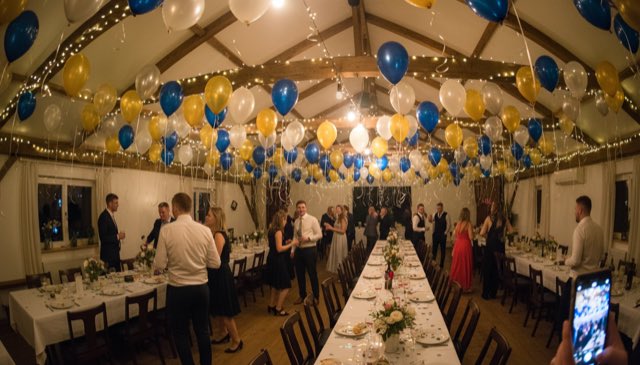
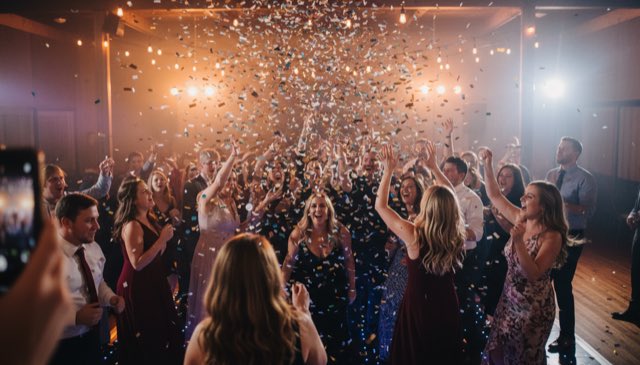
Open EveryTake on any TV or laptop and watch the album build itself in real time: the photo slideshow, the top-10 ranking, and the QR code for anyone not in yet. A photo hits the screen seconds after it's taken — and suddenly everyone wants their shot up there.

🦄 Maya
🤪 Funniest silly face
Scan to join 📸
It's my daughter's 7th birthday, dinosaur theme 🦖
Love it! I created 10 themed missions — how about “Fiercest roar 🦖 +20”?
Create your event in a conversation, not a form
Tell our AI the theme, who's being celebrated and the vibe — and it hands back a ready-to-go event with personalised photo missions in seconds. Want to tweak something? Just edit it. Setting up your album takes less time than picking the playlist.
Built for the whole party
No app, no account
Scan the QR, pick an emoji, you're in. Works in any phone's browser — from teenagers to grandparents.
Originals, untouched
Lossless mode keeps every photo's original file for you to download after the event, at full quality.
Properly live
Feed, likes, missions and ranking update in real time — on every guest's phone and on the big screen.
Privacy first
The album is private: only people at your event see the photos. No ads, no face recognition, and your photos never train AI. Delete the event and the data goes with it.
Pick your party's plan
Start with the Party Album, free. Need more? Unlock everything per event — or subscribe if you throw a lot of parties.
Party Album
- Up to 15 guests
- 20 photos per guest
- Live feed, missions, ranking and big screen
- Album kept for 30 days
Mini
- Up to 30 guests
- Missions, ranking and the live big screen
- Album kept for 90 days
- Save photos one by one (no full-album download)
Event Pass
- Unlimited guests and photos
- Album kept for 1 year
- Download the whole album as a .zip
Pass+
- Everything in Event Pass
- Untouched high-res originals
- Album kept for 2 years
Pro
- Everything in Pass+ across all your events
- Albums kept while your subscription is active
- For people who run many parties
- $87 every 3 months
Studio
- Everything in Pro
- Ongoing events, no end date
- For albums that run all month
Prices in USD; Stripe charges in your local currency at the day's rate. No waitlist — sign in with Google and create your album right away.
Born at a real party
EveryTake wasn't born in a meeting room — it was born at a real child's birthday party, the founder's own. QR codes on the tables, guests of every age joining in seconds, missions completed, a friendly fight for the top of the ranking, and the big screen stealing the show at cake time. It ran smoothly start to finish, and the party ended with an album full of takes no single camera could ever have caught.
Now we're opening EveryTake to more events — gradually, carefully, so every party goes as well as the first one did.
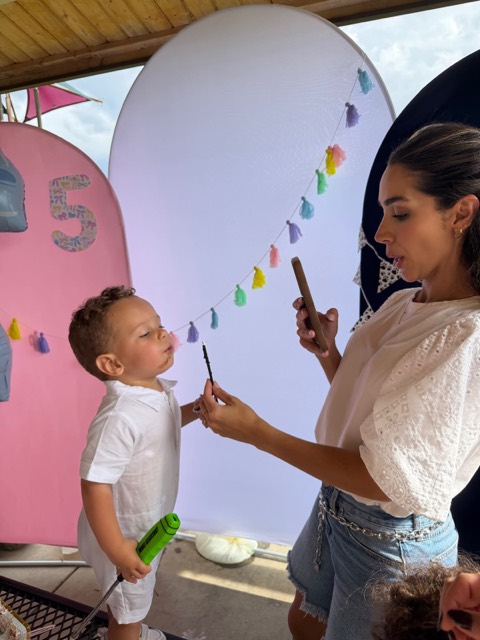
A real moment, straight from that first party: the same candle blow, captured by two different eyes.

Frequently asked questions
How do I collect photos from all my guests in one place?
With EveryTake, you print a QR code and leave it on the tables. Each guest scans it, joins from their browser and uploads photos straight into the event's collaborative album. No chasing pictures in group chats afterwards — everything lands in one place, in real time.
Do guests need to install an app?
No. EveryTake runs entirely in the phone's browser. Guests scan the QR code, type their name, pick an emoji avatar and they're in — no download, no sign-up, no password.
Does it work for weddings, graduations and corporate events?
Yes. Our AI adapts the photo missions to your event: a collaborative wedding photo album, a kids' birthday, a graduation, a company party — you describe the event and it builds the rest.
Do the photos lose quality?
In the live feed, photos are compressed so they load fast during the party. But with lossless mode, every photo's original file is stored untouched for you to download afterwards at full quality.
Who can see the photos? What about privacy?
Only people who joined the event see the album — it's never public. The photos belong to the host: we don't use them for ads, we don't run face recognition, and if you delete the event, the data is deleted with it.
How many guests can join?
EveryTake is built for real parties, from intimate dinners to packed venues. If your event is out of the ordinary — a festival, a conference — tell us and we'll figure it out together.
How much does it cost?
You start free: the Party Album (free) covers up to 15 guests and 20 photos per guest — everything shows in the feed and on the TV, and the album is kept for 30 days. Small party? Mini ($4.99, one-time per event) covers up to 30 guests with the full game — missions, ranking and the live big screen — kept for 90 days (save photos one by one). For bigger parties, the Event Pass ($19, one-time per event) unlocks unlimited guests and photos, keeps it for 1 year, and lets you download the whole album as a .zip. Pass+ ($39) also includes the untouched high-res originals and keeps it for 2 years. Running many events? Pro ($29/mo, billed every 3 months) unlocks everything across all of them and keeps your albums for as long as your subscription is active, and Studio ($79/mo) also unlocks ongoing events with no end date. Stripe charges in your local currency at the day's rate. Sign in with Google and create your album right away — no waitlist. (A refund or chargeback revokes access to the paid album.)
Does the venue need Wi-Fi?
Guests use their own connection (4G/5G or the venue's Wi-Fi). Photos are compressed before upload, so sending is light even on party-grade networks — and the originals are preserved all the same.
How do I put the live slideshow on a TV?
Any TV, projector or laptop with a browser works: just open your event's big-screen link. It shows the live photo slideshow, the top-10 ranking and the QR code for late arrivals.
Do you use facial recognition, or train AI on our photos?
No, and no. We never run facial recognition and your photos are never used to train any AI. The AI we use (Google Vertex) only writes the photo missions from your event description — it never sees or processes guests' photos.
Ready to start your album?
Sign in with Google, create your first event in seconds and start playing right away. Free to get going — no waitlist, no waiting.